The App for Recovering Lost Data

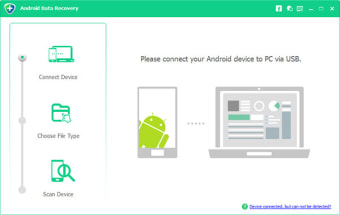
There are so many ways for you to lose the important data on your phone. With a few swipes, you can accidentally delete a photo or worse a contact. Luckily there are few data recovery applications available nowadays. One of those is the Android Data Recovery app. This utility software aims at recovering deleted or lost data from Android phones or tablets’ internal memory and SD card. In addition to media files and documents, it also rescues lost contacts and call history

Know Who They Are

Most file recovery applications deal with media files and documents lost due to accidental deletion, formatting, and virus infection. With Android Data Recovery, you can do this and more. With its contact and call history recovery, you will be able to get back all the phone numbers of saved in your phone. Not only that, you can restore the name, job title, phone number, and email of each contact. This way, you won’t have a hard time knowing who’s who and their affiliation. Android Data Recovery also allows you to save your contacts in VCF, CSV, and HTML formats to your computer. 

If you happen to lose all your call history, Android Data Recovery can help. The app can get back your call log easily, including phone numbers, names, dates, and even the calling types and duration. The app can do all this without having you worrying over data loss

Furthermore, Android Data Recovery comes with Android SMS recovery tool, which helps you take back deleted text messages. And like the call log recovery, each message is restored completely, including the content, the sender or receiver’s name, the sending date and time, and attachments, if there are any. 

Find Lost Files

Of course, Android Data Recovery wouldn’t be a file recovery software if it does not help you take back deleted files. The app will get all your types of media files, from photos to videos and music. Whatever video you have deleted, may it be downloaded from Youtube or recordings from your phone camera, you can find them using this app. The same goes for your audio files. Android Data Recovery can restore lost important voice memos and audio recordings

But what makes this app better than its competition is that it lets you restore file attachments and messages from WhatsApp, even though you have deleted it in your device. More so, it can recover documents in Word, Excel, PPT, and PDF, and HTML formats. It can even recover compressed files.

Android Data Recovery also lets you back up existing data to a computer without rooting the phone.

Take Back What You Lost

We all know that applications dedicated to recovering files are an essential tool for both computers and mobile phones. And if you are looking for a reliable data recovery app for your phone, Android Data Recovery is one of the better choices. The app offers easy recovery of files lost in various situations. More, it supports various file formats, so you don’t have to install separate apps if you lost all your data. With Android Data Recovery, you will never have to break in sweat whenever you accidentally delete a file.

  • Pros

    • Safe and Easy File Recovery
    • Recovers Various Types of Files
    • Restores SMS, Call Logs, and Contacts
    • Allows You to Back Up Your Files to a Computer Without Rooting
  • Cons

    • Not All Lost Files Are Recovered
    • Scanning for Lost File Sometimes Takes Ages
 0/1

App specs

  • License

    Free

  • Version

    5.2.0.0
  • Latest update

  • Platform

    Windows

  • OS

    Windows XP

  • Language

    English

    Available languages

    • German
    • English
    • French
    • Japanese
  • Downloads

    34.9K

    Last month's downloads

    • 174
  • Size

    29.98 MB

  • Developer

Program available in other languages


User reviews about Android Data Recovery

3

7 reviews

Main reviews for you

  • Anonymous user

    I like this software; it is very easy to use.. I like this software; it is very easy to use. I happened to delete all my notes on my Samsung S5 Last week. These are precious notes and don't want to lost it. So I find this software here. Firstly, I use the free version to see if it could scan those lost notes. To my surprise, The notes are scanned. It is free and it works. Good products! Pros: I like this software; it is very easy to use.

  • Anonymous user

    Really helpful to recover my deleted contacts from Google Nexus 4.. I wanted to sell my Google Nexus 4, so I deleted all my phone files. But unfortunately, I forgot to back up some important contacts of my old friends. So sad. I lost them. Then my daughter helped me to download several Android data recovery tools, but only this software works very well, and I got back my important contacts. Really happy. Pros: very fast to recover deleted datauseful to get back my contacts Cons: if it can recover video, that will be better.Waiting for more features.

  • Anonymous user

    Aprreciate it greatly. I can get back my lost contacts and messages.. Last month, when I was on holiday in London, my Motorola X was stolen. With the help of police, I got back my phone. But it was damaged and I could not turn on it. But I really need to retrieve my important contacts and text messages. Then I found this free Android Data Recovery tool, and tried it. And it did work. I recover my contacts and text messages from the broken phone. I only follow the guidance of this software to connect my computer, with minutes, I made it. Thanks a lot. Pros: the guide is easy to follow it.very quick to recover my lost data.I love the design of this program, very beautiful. Cons: Hope its upadting.Wish it can recover video files.

  • Anonymous user

    Very helpful. really happy to get back my contacts and text messages.. Last month, when I was on holiday in London, my Motorola X was stolen. With the help of police, I got back my phone. But it was damaged and I could not turn on it. But I really need to retrieve my important contacts and text messages. Then I found this free Android Data Recovery tool, and tried it. And it did work. I recover my contacts and text messages from the broken phone. I only follow the guidance of this software to connect my computer, with minutes, I made it. Thanks a lot.

  • Anonymous user

    Very powerful to recover my text messages. Appreciate it.. My cat deleted my text messages from my boss on my Sony mobile by hitting backspace when I was ready to read it. It really annoys me. I totally did not have any clue about the message. Then my friend recommended this software, Android data recovery, I tried it, and it did work. So amazing!!! It's very easy to use, and I got back the message. Also, I use it to recover my deleted photos and contacts. Really appreciate it. Pros: very easy to use.recover text messages and photos safely Cons: if it's free, will be better

  • Anonymous user

    Very fast and easy to recover all my messages.. I deleted all the messages from my Sony by accident. The messages are from the day our daughter went to college. So I download your program. I went to recover. Yes, it did work, very fast and simple to operate. Now I can keep these backup messages on my computer. It's really an excellent recovery software. Pros: fast and simple to operaterecover all the data freely.

You may also like

Alternatives to Android Data Recovery

Explore Apps

Latest articles

Laws concerning the use of this software vary from country to country. We do not encourage or condone the use of this program if it is in violation of these laws.
Softonic
Your review for Android Data Recovery
Softonic

Is Android Data Recovery safe?

99/100

Score result: Clean

This file passed a comprehensive security scan using VirusTotal technology. It is safe to download.

  • Virus free
  • Spyware free
  • Malware free
  • Verified by Security Partners

    VirusTotal logo

Scan Info

Last scan
Thursday, December 28, 2023
Scan provider
VirusTotal · Full report

File Integrity

File
tenorshare-android-data-recovery-trial.exe
SHA256
4ca453ba4a2f75d5b0d5a143e423468740bf490b6fb178a76792a93b8cdec874
SHA1
8af856a159319ddcddafebb799206bf1ee9113cf

Softonic security commitment

Android Data Recovery has been thoroughly scanned by our advanced security systems and verified by industry-leading partners. This file comes from the official developer and has passed all our security checks, showing no signs of viruses, malware, or spyware.